Tuesday, February 24, 2015

Superhero Products: Saving one classroom at a time!


Sometimes, a good TPT product can really save the day! Today, we are linking up with Jivey to share some of our heroic products and the fabulous feedback teachers have left on them.

Cassie at Funky in Fourth has been getting some great feedback on her Solar System Unit.

Juliet, the Tech Crazy Teacher, has gotten fantastic feedback on her Treasure Map Project Based Learning activity.

Kristen gets fabulous feedback from teachers using her Word Work for Big Kids vocabulary activities. 

Check out these and other superhero products in our TPT stores, and save up to 28% during the sitewide sale! Each of us will have our stores on sale Wednesday and Thursday this week, with an additional 10% off sidewide Wednesday using the code HEROES at checkout.

Hop over to Jivey's Superhero Product linky to see some more day-saving products from TPT authors!

Sunday, February 22, 2015

Sunday Scoop {2.22.15}


The Sunday Scoop is based on the popular 3-2-1 graphic organizers so many of us use with our students. Tell us three things you HAVE to do, two things you HOPE to do, and one thing you're HAPPY to do. If this is your first time linking up, check out our Linky Parties page for details!
Here's the Scoop on my week...
If you don't already know... I am in Atlanta right now for the EdExpo. I flew in on Friday evening and {the absolutely wonderful} Kristen picked me up from the airport. We have never "officially" met before! So exciting! Yesterday we went on a fun "Walking Dead Tour" outside of Atlanta with another blogger and we had so much fun! Today we will be walking the exhibit hall, looking for what products we absolutely love. Tomorrow I travel home. I fly out in the late afternoon, but have a long layover in Minneapolis, so I won't actually be getting home until almost midnight. Tonight I hope to get a good night sleep so that I am ready to teach on Tuesday. I know I won't sleep at all tomorrow night... I need to get some cuddles in with the pups. :) I leave you with this photo... we may have had a "little" bit of fun while we were on the tour.


Thursday, February 19, 2015

Tech Thursday: Making Google Drive work for my class


Technology Thursday is a weekly linky dedicated to all things technology related. Check out our Linky Parties page for details on how to link up!


Google drive is a great tool that is gaining popularity in educational settings. To be honest, when my district began using Google Apps for Education and had accounts for all students in grades 3 & up, my first thought was that this was too much, too difficult for our younger students. I stand corrected!

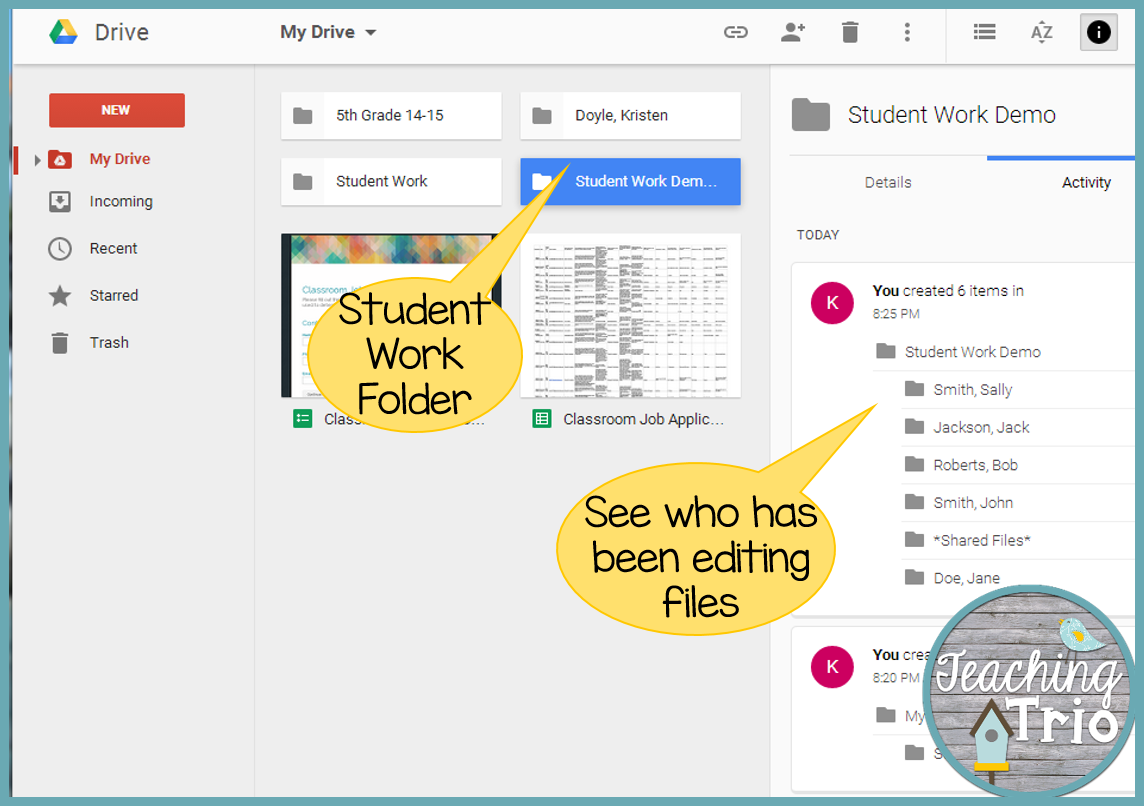
It's all about using it in a way that younger students can handle. Here's how I set it up in my 5th grade classroom. (I've created a demo folder to protect my students' names.)


Within my own Google Drive account, I have created a Student Work folder. This is where all student work will go. I teach my homeroom all day, but if we were departmentalized, I would create a folder for each class within this folder.


Inside the Student Work folder, I have one folder called *Shared Files* (the asterisks keep it at the top of the folder list for easy location). This folder is shared with every student in my class. Inside, I post assignments, rubrics, images students may need for a project, etc. Students also save group work here. The key to remember is that EVERY student has access to these files.

The rest of the folders are individual student folders, named "Last, First." Each of these folders is shared only between the individual student and myself. This is where students save their work for me to grade. To share folders, just click the share button and enter the appropriate email addresses. Since we are a Google Apps school, when we start typing a name, the email pops up.


You can set up each of these folders yourself, and share them with the correct students. If your class is a little more tech-savvy (or just good at following directions), you can do what I did, and talk the students through creating their own folder and sharing it with you. I did this by putting a good student on the Smart Board computer and dictating directions to him for setting up his folders while I stood behind the rest of the class so I could watch their screens to make sure they were on track and to help when needed. The students were excited, so they listened really well.

Then, we went over all of the different things they can create. Here's a breakdown for you of how the Google Apps align with Office products you already use.
Google Docs = Word
Google Sheets = Excel
Google Slides = PowerPoint
Google Forms - great for collecting data for your graphing unit!

We also practiced creating a new Google Slides doc to give them some practice working online. 

Some tips I learned the hard way...
  • Be very clear on how you want files saved. My system is Assignment-Student Name-Date.
  • Decide how you want students to let you know they are ready for you to grade longer-term assignments. My students add -FINISHED to the file name.
  • Every time students create a new document in a shared folder, it will ask them if they are SURE they want to share this document. Practice this with them the first time so they will know it's ok!
  • There is no save button because changes are saved automatically. I taught my class to double check where it says "all changes have been saved in Drive" at the top of the window.

So once it's set up, what do I do with it?
  • Students do all of their writing final drafts, and some rough drafts, here.
  • Students do some of their center work here, including vocabulary work from my Word Work for Big Kids activities.
  • We complete group projects in Google Drive and share Slides presentations with the class.
  • I created a Google Forms "Classroom Job Application," which students absolutely loved filling out. They took it so seriously!

If you're using Google Drive, I'd love to hear how you use it and any tips you have for us! Link up your tech posts below!


Tuesday, February 17, 2015

Odd One Out- Math Strategy Game {With A Freebie}


Do your students like to play games? Do they like to play math games? Do they like strategy games? I am going to share a math strategy game with you. It is called Odd One Out. I learned about this game last year at a workshop. There wasn't a game board or a recording sheet, so of course I *had* to make one. We started playing it during the first few weeks of school this year and it is still one of the favorite games during math workshop. My students last year, figured out the strategy pretty quickly. My group this year... not so much. A few of them "think" they have a strategy figured out, so I challenge them to a game and prove their strategy wrong!

To play the game, students need 15 math chips. You could use just about any sort of counter or chip that you have in your classroom. Students are in groups of two to play the game. If you have an odd number, you can play too! Another option would be to put three students in a group and have them rotate each game (two students playing, one student recording). Students also need the Odd One Out Game Board and the Recording Sheet. I have uploaded these as a FREEBIE for you! Click here to download them.

The way the game works, students place all 15 chips onto the game board where the little snowballs are. They should have 3 in the top row, 5 in the middle row and 7 in the bottom row. Color doesn't matter. Then they take turns removing chips. They can remove any number from any one row. They cannot take chips from multiple rows. This means that they could remove all of the chips in one row in one turn or only take one chip. The choice is theirs.

When they have taken a chip or chips from a row, they need to record it on the sheet. My students got a system figured out... if you are taking the chips, the other player records for you. It works out really well. Let's look at this picture so that I can explain what I mean by record their move.
This student is going to remove two chips from the top row. They would record under player one, 2 T. You can totally have your students write the full word (top, middle, bottom), but for me a T, M or B does the trick.

Then it is the next players turn to take chips. This continues until one of the players clears the last chip(s). Let me tell you, the first few moves are fast... then all of the sudden playing comes to a near standstill while a player is trying to figure out their move. Talk about deep thinking!!! They have to plan ahead and try to guess what the other player might do. Here are some pictures of my students mid-action.
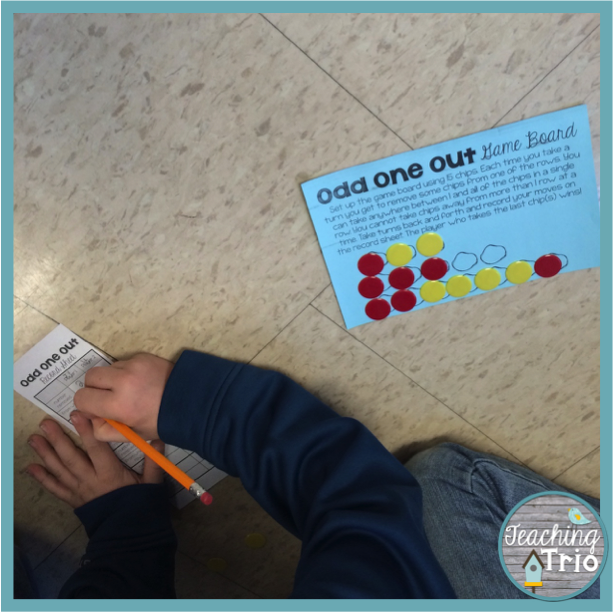
You can see little plastic cups in the pictures? These are portion containers that you can find at most grocery stores in the plastic cups/paper plate aisle. These little containers have lids. I use them to keep my math chips in specific amounts for certain games. I have a few different sets of these containers labeled with a game title on the lid. This one is for a game called Bump which requires each player to have 8 chips (2 different colors). I put 16 chips in each cup and labeled the cup Bump. With the game, Odd One Out, the color of the chips doesn't matter and they only need 15 chips... so my kiddos know to just grab a bump chip container and they are good to go. So slick!

My favorite part about this game is seeing the strategies that my students come up with. They are all very interesting and most of the time the strategy is one I would have never come up with. Students can show me their strategies on Fridays during math workshop. This is their chance to "challenge the teacher-master". Basically... that means they get to explain their strategy to the class and then face off against me under the document camera. Only once has a student figured out the strategy (and that was last year). I let my class keep trying over and over again. A few of my students said that they have played the game at home with random things like legos as the chips. *insert thrilled teacher here*

I hope that this is a game that you can use with your students. It is definitely a game that is fast and you could use it in between instruction times if you have a few extra minutes. I know with testing looming over all of us, there is always a few minutes here or there. Make sure you grab the freebie to use with your class. The recording sheet is totally optional. I like to see the steps my students take, but it could easily be skipped. Hope you love it!

Sunday, February 15, 2015

Sunday Scoop 2/15/15


The Sunday Scoop is based on the popular 3-2-1 graphic organizers so many of us use with our students. Tell us three things you HAVE to do, two things you HOPE to do, and one thing you're HAPPY to do. If this is your first time linking up, check out our Linky Parties page for details!


It's Sunday again and time for my scoop!


If you haven't checked out Enclave, Outpost, and Horde in the Razorland Trilogy, you are missing a great dystopian read!  Ann Aguirre pulls you right in and hooks you- line and sinker!


What have you got on your agenda this week?